
March 6, 2026
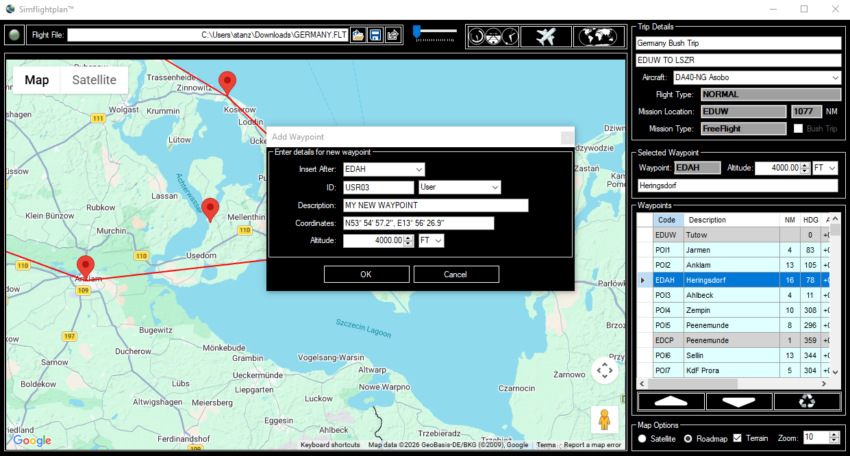
A feature update to Simflightplan™ is available now! It contains a number of features that didn’t make it into the January Release as well as some bug fixes. Check out the video below to see the significant changes.
FEATURES:
-Heading displayed for waypoints in grid
-Current heading added to cockpit informational caption
-On-map version of cockpit map informational caption at the bottom of map.
-User waypoints will be auto-detected in flight when renamed by Garmin glass cockpit based on the order of waypoints in the flight plan.
-Maintain grid column width changes during current session.
-Sim spawn positon picker.
FIXES:
-New waypoint form can be moved to view the map.
-Grid selection follows waypoint selection by clicking pushpins correctly.
-Flight plan flagged to save after leaving Waypoint Altitude field only if altitude is actually changed.
-Waypoint move confirmation only fires once after dragging.
-Sim spawn heading & coordinates saving correctly when manually set.
-Flight Settings, Aircraft Settings and Fuel Tanks forms will open centered over the Main Window.
*Note - This list is only the major fixes, there were a number of performance enhancements and minor fixes that are not listed.
Simflightplan™ is a Google Maps flight planning add-on for use with Microsoft Flight Simulator. Simflightplan™ can be used to create and share your own flight plans using an interactive Google Maps drag-and-drop interface complete with terrain elevations, landmarks, streetviews, etc. Click on the interactive map to drop a pin at any location on earth, plus edit your aircraft and flight plan settings before you get in the cockpit.
Download Simflightplan™ for Flight Simulator for free now! Google Maps API subscription is included free for 7 days.
Simflightplan™ is always free to use for editing and modifying flight plans, a Google Maps API subscription is required to continue using the map features. Software updates and upgrades are free for life.
Note: Each PC can be registered to only 1 user, so please make sure you are using the same PC you run Microsoft Flight Simulator 2020 on when you open Simflightplan™ for the first time.